วิธีการตรวจสอบว่ามี certificate อยู่ใน trust store บน Docker container
วันก่อนบริษัทลูกค้าประกาศว่า third-party dependencies จะเปลี่ยน certificate chain ไปอ้างอิง DigiCert Global Root G2 และบอกว่าทุกระบบที่เรียกเข้าระบบต้องมี root ตัวนี้ใน trust store (ที่เก็บ root certificate) ภายในวันเวลาที่กำหนด ไม่งั้นจะ TLS fail ทันที กลับที่ระบบงานของเราที่เป็น .NET app run อยู่ใน Docker container คำถามคือ
ต้องทำอะไรไหม?
คำตอบคือเราจะ check ว่ามี root certificate นี้อยู่ใน trust store ของ application คำถามต่อมาคือ
แล้วทำยังไงล่ะ
.NET ใช้ trust store จากไหน
ก่อนอื่นต้องเข้าใจก่อนว่าเวลา .NET request ไปที่ API ใด ๆ ด้วย HTTPS ผ่าน HttpClient
มันไม่ได้ใช้ trust store จากเครื่องเรา (Mac/Windows) แต่มันใช้ trust store จาก OS ภายใน container
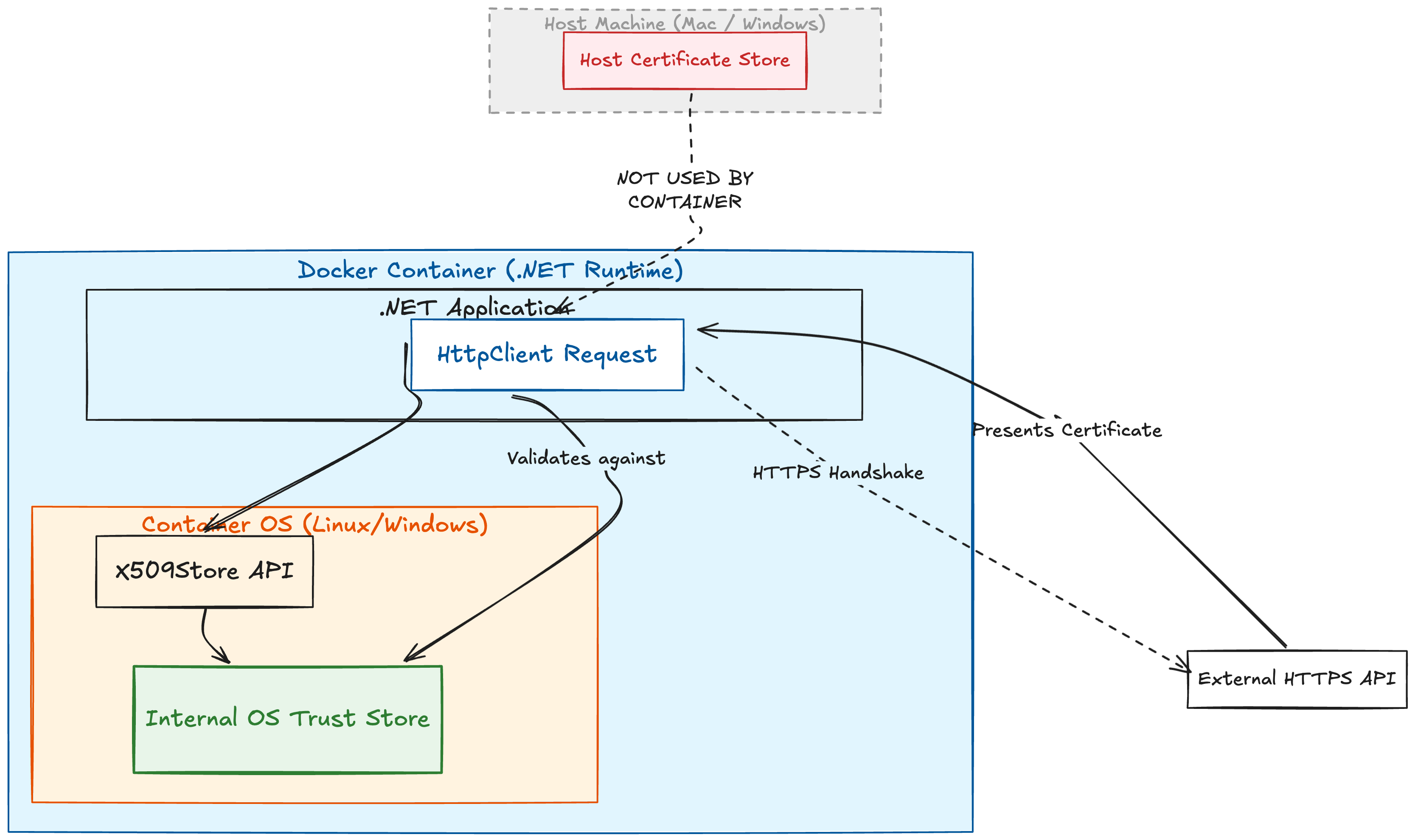
ดังนั้นสิ่งที่เราต้อง check คือ ใน container มี root certificate (ในตัวอย่างคือ DigiCert Global Root G2) นั้นอยู่ไหม
1. เข้าไปดูใน container ก่อน
ถ้า container กำลัง run อยู่:
docker exec -it <container-name> sh
หรือถ้ายังไม่ได้ run:
docker run -it --rm mcr.microsoft.com/dotnet/runtime:8.0 sh
(เปลี่ยน tag ให้ตรงกับของที่ใช้จริง)
2. ดูว่ามี root certificate ไหม
ในแต่ละ OS เขาก็จะเก็บ trust store ไว้ใน directory ที่ต่างกัน ในส่วนของ Linux-based image (Debian/Ubuntu) cert จะอยู่ที่ /etc/ssl/certs
จากตัวอย่าง DigiCert Global Root G2 ให้ run คำสั่งเพื่อตรวจสอบว่ามี root certificate ไหม:
ls /etc/ssl/certs | grep -i digicert
(เปลี่ยน digicert ให้ตรงกับของที่ใช้จริง)
ถ้าเห็นประมาณนี้:
DigiCert_Global_Root_G2.pem
DigiCert_Global_Root_G3.pem
DigiCert_Trusted_Root_G4.pem
...
แปลว่าไฟล์ root certificate อยู่ใน trust store แล้ว
3. ทดสอบว่าสามารถใช้งานได้
เพื่อความมั่นใจ ให้ run คำสั่ง openssl เพื่อดู subject กับ issuer ของ root certificate:
openssl x509 -in /etc/ssl/certs/DigiCert_Global_Root_G2.pem -noout -subject -issuer
ถ้าขึ้นแบบนี้:
subject=C = US, O = DigiCert Inc, CN = DigiCert Global Root G2
issuer=C = US, O = DigiCert Inc, CN = DigiCert Global Root G2
แปลว่าเป็น self-signed root CA ตัวจริง และถูกติดตั้งใน trust store แล้ว
หรืออีกท่่านึงก็คือ test แบบ end-to-end โดย run คำสั่ง openssl เพื่อ connect กับ server จริงไปเลย
openssl s_client -connect example.thirdparty.api.com:443 -servername example.thirdparty.api.com
ดูบรรทัดท้าย ๆ ถ้าเห็น:
Verify return code: 0 (ok)
แปลว่า container ของเราสามารถ validate certificate chain ของ third-party ได้เรียบร้อย
แล้วถ้าไม่เจอล่ะ
ถ้าใช้ official image ที่ไม่ได้เก่ามาก ปกติจะมี root certificate เจ้าดัง ๆ มีมาตรฐาน เช่น Digicert อยู่แล้ว แต่ก็จะมีบางกรณีที่ต้องระวัง เช่น
- ใช้ image เก่ามากแล้วไม่เคย rebuild
- ใช้ distroless image
- มี custom CA bundle ของตัวเอง
- มี certificate pinning ใน code
ถ้าไม่ใช่ case พวกนี้ ส่วนใหญ่ปลอดภัย แต่ถ้าไม่มีจริง ๆ ต้อง install cert เพิ่ม ด้วยคำสั่งนี้
sudo cp /path/to/your/<certname>.crt /usr/local/share/ca-certificates/<certname>.crt

sudo update-ca-certificates
ดูบรรทัดท้าย ๆ ถ้าเห็น:
done.
แล้ว re-build Docker image ใหม่ก็เป็นอันจบงาน